
What is a Wallet?
A Wallet is your online digital payment balance that your company has budgeted for your apparel for the current session/year.
How do I check my Wallet amount?
Wallets can have different amounts depending on what’s been allotted to you.
To view your available balance:
Click the My Account button
Select Wallet
Your wallet balance will be displayed there
How do I apply my Wallet?
To apply your wallet funds to an order:
Add your items to your cart
Go to the Checkout page
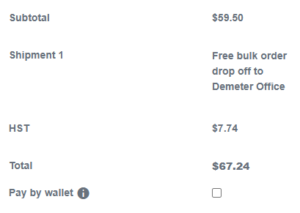
Under the total amount, you will see a Wallet checkbox
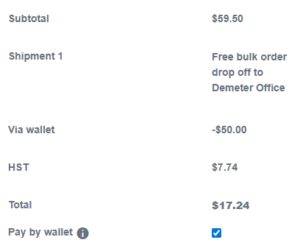
Click the checkbox and your wallet funds will automatically be applied to your order total
See the example below showing before and after applying wallet funds.
Can I go over my Wallet amount?
Yes — you can still place an order even if your total is higher than your wallet balance.
At checkout:
Select the Wallet payment option to apply your available wallet funds
If your order total is over your wallet balance, when you click Purchase you will be prompted to enter your credit card details to pay the remaining amount
Having issues with your Wallet?
If you’re having trouble with your wallet balance, checkout, or anything not showing correctly, email rick@wscimage.com and we’ll help get it sorted.